Showing posts with label technology. Show all posts

Tuesday, February 21, 2012

Another first from Globe: Visayan customer hotline


Globe Telecom marks another milestone in the Philippine telecommunication industry, offering the first trilingual customer hotline service with the launch of its Visayan interactive voice response (IVR) system. 


With the launch of the new hotline system, Visayan-speaking Globe subscribers can call 730-1000 from any landline or 211 from any Globe or TM mobile number and simply follow the voice prompts so they are directed to a Visayan-speaking customer service representative. They can then inquire about Globe broadband and landline services or raise concerns and requests, while conversing in Visayan. The Visayan-speaking customer service representatives (CSR), based in Cebu, will be on hand 24/7 to accommodate calls.


“Once again, we are raising the bar of customer hotline services by putting in place a system that can fully understand queries and concerns of a specific group of subscribers,” said Joe Caliro, Head for Customer Experience of Globe. “This is a milestone not just for Globe but most importantly for our Visayan subscribers because their concerns will be addressed at the soonest possible time in their own language.” 

The hotline service is done in partnership with Aegis People Support and Tech Mahindra, two of the best-in-class contact center firms in the global business process outsourcing (BPO) industry. 

The Visayan language is the second most-widely spoken dialect in the country, with over 20 million Filipinos speaking the language in various provinces and cities in the Visayas and Mindanao. 

In addition, Globe has set up more customer service channels in addition to its existing channels such as the Talk2Globe Hotline via 730-1000 (toll-free via Globe Landline) or 211 (toll-free via Globe/TM mobile), official Talk2Globe accounts in Facebook and Twitter, and the Talk2Globe e-mail account (talk@globetel.com.ph) to reach more subscribers and to immediately respond to queries and concerns on its services available for Globe subscribers. 

These new Talk2Globe channels include chat functionality available on the Globe website or via Yahoo! Messenger (by adding the Talk2Globe account—Talk2GLOBECHAT) that provides real-time feedback from customer service representatives who are on duty 24/7. Globe subscribers anywhere in the Philippines can also get assistance by texting HELP to 1234 for free. 

Globe also launched *143#, the newest and easiest quick-service menu that allows subscribers to know more about the latest Globe promos at the touch of a button for free. Just dial *143# and press the call button on the mobile phone to quickly access billing and load details, as well as call, text and surfing promos, do GCASH transactions, download related services, and share prepaid load to Globe and TM users without having to memorize registration codes and access numbers. 

Monday, December 5, 2011

Globe iPhone 4S Update: The Countdown Begins


We know you're excited for the new iPhone 4S, and you want the experience to be as hassle-free and smooth as possible from start to finish.  With more than three years of experience with the iPhone, Globe Telecom is THE proven provider for anything and everything about this must-have gadget.


Registration for the Globe iPhone 4S has started last week, and we'd appreciate it if you would share the Registration of Interest link to your dear readers.

http://iphone4s.globe.com.ph/

The launch of the Globe iPhone 4S is on December 16, 2011.  Between now and December 16, visit the official #GlobeiPhone4S site to register your interest, and be one of the first to get the iPhone 4S only from Globe Telecom.

Thursday, October 6, 2011

Steve Jobs, Apple Co-Founder, Is Dead


Steve Jobs, the man behind the Apple gadgets such as iPhone, iPod, iMac, iPad and Macbook and named as one of the greatest American CEOs of his generation died on Wednesday at the age of 56, after years of battling cancer and other health issues.


Photo by: winnersdelhinews.com

His untimely demise was announced by his company, Apple in a statement late on Wednesday.

It was noted that last August, he resigned as the CEO of the world's largest technology corporation handing the reins to current chief executive Tim Cook.

Jobs fought a rare form of pancreatic cancer for years has been deemed as the heart and soul of Exxon Mobil's number one rival in terms of value in America.

His untimely death made millions of Apple users worldwide to be on iSad and iCry mode.

Photo by ipadngravy.com

Rest in peace, Steven Paul "Steve" Jobs! Thank you for making our lives easier and efficient, sir!

Friday, September 23, 2011

How To Enable Facebook Timeline

Yesterday, Facebook's CEO Mark Zuckerburg has announced the new feature of Facebook, which includes archives and timeline that enables users to browse their past contents, photos and statuses. It is one of the site's breakthrough that allows its users to reminisce how great they were a few years back (sarcasm intended).


Fortunately, enabling Timeline a bit early isn’t too difficult — but it’s not at all straight forward, either.

As you all know, enabling Facebook's timeline feature at this point is open graph developers. You, too, can be an open graph developer — even if you’re just looking to dabble.


A few things before enabling this feature to your Facebook account:


  • Expect a LOT of bugs. It would be a pain in the ass and frustrating, unless if you're actually a developer.
  • It's only you who can view your timline (unless if you decide otherwise) but will be seen by the public a few days after.
  • It seems that if you login into Facebook on another machine, Timeline gets disabled automatically on all of your machines. With that said, it seems you can get back to your timeline (but ONLY after following the steps below) by navigating to http://www.facebook.com/YOURUSERNAMEHERE?sk=timeline
  • You’ll need to have a “verified” account for one of the steps, which means you need a credit card or phone number attached to the account.
Are you ready? Now let's tweak your Facebook!


Here's how to do it:


1. Log into Facebook

2. Enable developer mode, if you haven’t already. To do this, type “developer” into the Facebook search box, click the first result (it should be an app made by Facebook with a few hundred thousand users), and add the app.


3. Jump into the developer app (if Facebook doesn’t put you there automatically, it should be in your left-hand tool bar)

4. Create a new app (don’t worry — you wont actually be submitting this for anyone else to see/use). Give your shiny new app any display name and namespace you see fit. Read through and agree to the Platform Privacy agreement. This is the step you need to be verified for.

5. Ensure you’re in your new app’s main settings screen. You should see your app’s name near the top of the page

6. Look for the “Open Graph” header, and click the “Get Started using open graph” link.

Create a test action for your app, like “read” a “book”, or “eat” a “sandwich”


7. This should drop you into an action type configuration page. Change a few of the default settings (I changed the past tense of “read” to “redd” — again, only you can see this unless you try and submit your application to the public directory), and click through all three pages of settings

8. Wait 2-3 minutes

9. Go back to your Facebook homescreen. An invite to try Timeline should be waiting at the top of the page

And you’re done! We’ve seen this work quite a few times now, so it should work without a hitch for just about anyone.

Special thanks to TechCrunch!


Friday, September 16, 2011

The New Blue Screen of Death

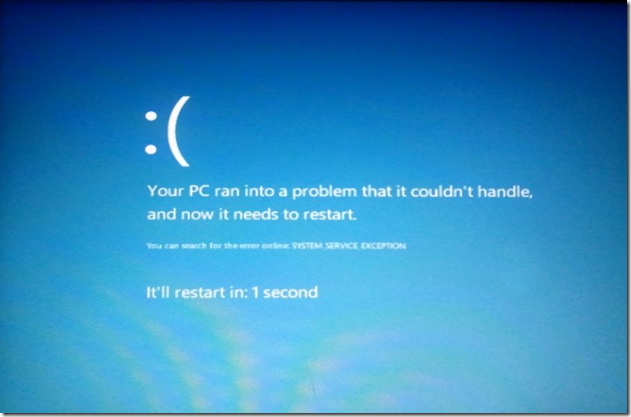
Developers of Windows 8 has unveiled the new look of the Blue Screen of Death.

Most of the users are pretty much annoyed with the previous versions of the BSOD since it was not written in a simple language.

To quote one user of Windows 7, "I really hate seeing the Blue Screen of Death; it terrifies me a lot. Aside from the fact that my laptop's crashing, I can't seem to grasp the true meaning of its demise. For five seconds, I'd just stare at my laptop screen, trying to figure out what the hell's happening to my laptop and moments after, it will restart all by itself leaving the us, the users clueless."

Now, the developers of Windows 8 has released the new look of the BSOD.

The new look of BSOD

Well, it has indeed improved compared to the previous versions of it. And yeah, they're beta bits for sure. We can't hardly wait for Windows 8's release.

So what can you say about it?

Wednesday, June 29, 2011

Samsung Galaxy

Samsung Galaxy

 Samsung and Samsung Galaxy is the demand of the days. People dont only love the Samsung Galaxy sets for their beauty but Samsung Galaxy sets also contains so many advance features in them which are the requirements of days like, internet with fast speed, online every time, good service quality, nice pictures results from mobile camera, and so many other things like that. So Samsung Galaxy sets provide you variety of Samsung Galaxy sets like Samsung Galaxy Tab, Samsung Galaxy Pro, Samsung Galaxy S, and so many other mobile sets like that. So check your set Under this beautiful and attractive technology and get your type of Samsung Galaxy.

Samsung Galaxy

Samsung Galaxy

Samsung Galaxy

Samsung Galaxy

Samsung Galaxy

Samsung Galaxy

Samsung Galaxy

Samsung Galaxy

Samsung Galaxy

Wednesday, June 22, 2011

Choosing the Right Camera Buyer


Choosing the Right Camera Buyer

 Digital Cameras gentlemen's lover, if you want to buy a camera that gives you the right to determine the brand model of course in accordance with the money you have. Little input to your readers the good for those of you who want to buy a camera.

When choosing the right camera to buy you need to consider the following. The camera is generally divided into two main categories: Point-and-shoot and Single Lens Reflex (also known as the "SLR"). Camera A Point-and-shoot is any camera, digital or film, which does not have a detachable lens.

                                                     Choosing the Right Camera Buyer

 Most point-and-shoot compact and lightweight. They almost always have the ability to zoom (both optical and digital). If you are just starting you may already have a point and shoot camera. An SLR on the other hand, will have the ability to have a removable or interchangeable lenses. In addition, they usually offer more options for controlling the camera. You will be able to shoot in full automatic or full manual and some other species such as aperture priority mode or shutter. The difference is the largest and perhaps most important is to distinguish the digital point-and-shoot from digital SLRs in image quality each capable of making.

                                                         Choosing the Right Camera Buyer

While point-and-shoot camera has its own advantages; They are lightweight, easy to use and cheaper than SLR. They can not compete with the SLR in terms of picture quality. That's because digital SLRs have larger image sensors and image sensor produces larger pixels, the greater the quality is higher. This larger pixel picture quality is much higher. Produced high quality images with an SLR, because the ability of such enlargement, will sell at the market more than taken with point-and-shoot. Point and shoots can boast having 8 or 10 mega pixel but the fact remains, their image sensors are smaller and this means smaller pixels, too.
Camera, Canon, Digital, Fuji, Nikon, Samsung, sony, cyber shot, camera, technology, cameras